

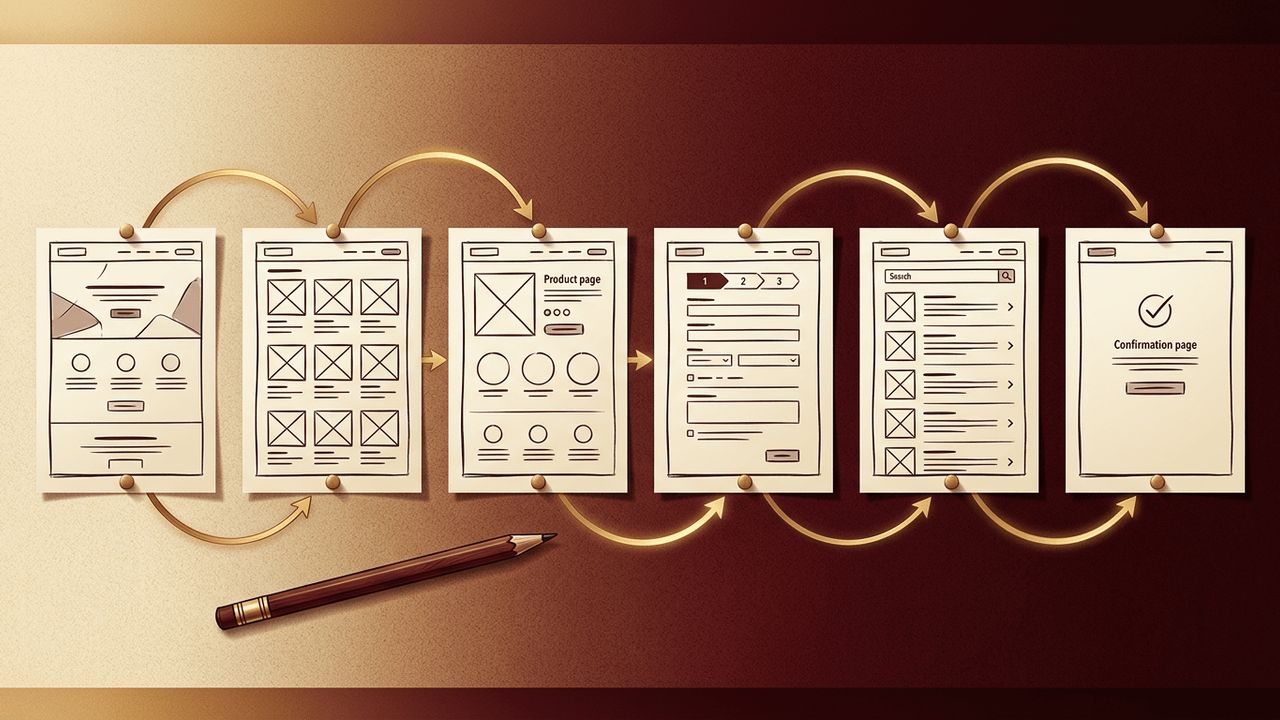
Great websites rarely happen by accident. Before designers choose colors or developers write a single line of code, successful teams spend time planning how users will experience the site from start to finish. One of the most useful planning tools in this process is the storyboard. Borrowed from filmmaking and animation, a storyboard in web design is a visual sequence that illustrates how a user interacts with a website, step by step. This article explains what a web design storyboard is, why it matters, what it should include, and how to create one effectively.
How AAMAX.CO Uses Storyboards to Plan Better Websites
Careful planning is what separates average websites from exceptional ones. AAMAX.CO is a full-service digital marketing company offering web development, digital marketing, and SEO services worldwide. Their design process includes discovery workshops, user journey mapping, and storyboarding to align every stakeholder before production begins. Through their website design services, they translate storyboards into polished interfaces that guide visitors naturally toward their goals.
What Is a Storyboard in Web Design?
A web design storyboard is a series of sketches, diagrams, or simple mockups arranged in sequence to show how a user moves through a website or completes a specific task. Each frame represents a screen, page, or key moment in the experience, often accompanied by notes describing the user's goal, action, and the system's response.
Unlike a sitemap, which shows the overall structure of pages, a storyboard focuses on the narrative of a user's journey. It answers questions like: Where does the user arrive? What do they see first? What action do they take next? How does the website respond?
Why Storyboards Matter
- Clarify user journeys: Storyboards reveal how visitors will navigate the site to achieve specific goals.
- Align teams and stakeholders: Visual stories are easier to understand than technical documents, helping clients, designers, and developers share a common vision.
- Identify problems early: Gaps in logic, confusing steps, or missing content become visible before costly design and development work begins.
- Focus on user needs: Storyboards keep the team centered on real scenarios rather than abstract features.
- Save time and money: Changing a sketch is far cheaper than rebuilding a finished page.
What a Web Design Storyboard Includes
While formats vary, effective storyboards usually contain:
- User persona: A description of the person whose journey is being illustrated.
- Scenario or goal: The task the user wants to accomplish, such as booking a consultation or purchasing a product.
- Entry point: How the user arrives, such as through a search result, social post, or email link.
- Sequential frames: Simple sketches of each screen or interaction.
- Annotations: Notes describing user actions, emotions, content requirements, and system responses.
- Outcome: The end of the journey, such as a confirmation page or completed purchase.
Storyboards vs. Wireframes vs. Prototypes
These planning tools are related but serve different purposes:
- Storyboards tell the story of a user's experience across multiple screens, emphasizing flow and context.
- Wireframes are detailed layouts of individual pages, showing the placement of elements like headers, images, and buttons.
- Prototypes are interactive models that simulate how the final website will behave.
Many teams start with storyboards to define the journey, create wireframes for each key screen, and then build prototypes for testing.
How to Create a Storyboard for a Website
1. Define the Goal
Start with a clear objective. What should this user journey accomplish for both the visitor and the business?
2. Understand Your Users
Use research, analytics, and customer interviews to create realistic personas and scenarios.
3. Map the Journey
List each step the user takes, from discovering the website to completing the goal. Keep the steps concise and focused.
4. Sketch Each Frame
Draw rough representations of each screen. Precision is not required; simple boxes and arrows are enough to communicate the flow.
5. Add Annotations
Describe what the user is thinking, what they click, and how the website responds. Note any content, data, or functionality needed.
6. Review and Refine
Share the storyboard with stakeholders and, ideally, potential users. Gather feedback and adjust the journey before moving into detailed design.
Tools for Web Design Storyboarding
Storyboards can be created with pen and paper, sticky notes on a whiteboard, or digital tools. Collaborative whiteboard apps, design software, and presentation tools all work well. The best tool is the one your team will actually use, since the value lies in the thinking, not the polish.
Tips for Effective Storyboards
- Keep each storyboard focused on one scenario.
- Prioritize clarity over artistic detail.
- Include mobile and desktop variations if experiences differ.
- Highlight decision points and potential friction.
- Revisit storyboards when requirements change.
Conclusion
A storyboard in web design is a visual narrative that shows how users move through a website to accomplish their goals. By mapping journeys before design and development begin, storyboards help teams align on vision, uncover problems early, and create experiences centered on real user needs. Whether sketched on paper or built digitally, storyboarding is a simple yet powerful step that leads to more intuitive, effective, and successful websites.
